



Phoenix for CS 2
Counter-Strike 2
Description
Phoenix delivers unparalleled control over CS 2 with detailed customization for every game aspect:
-
Smart aimbot with weapon-specific settings, recoil control (RCS), and trigger bot
-
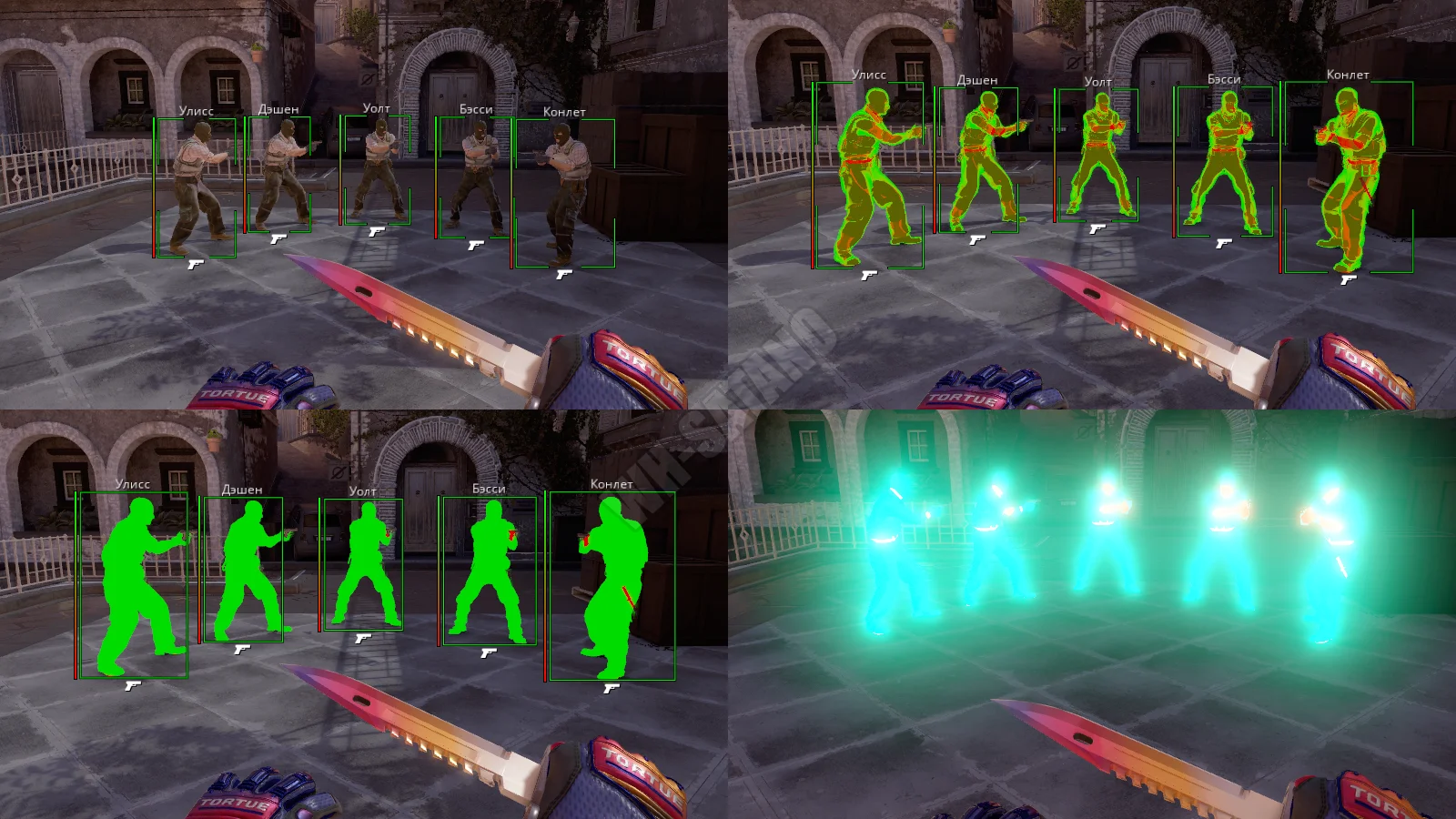
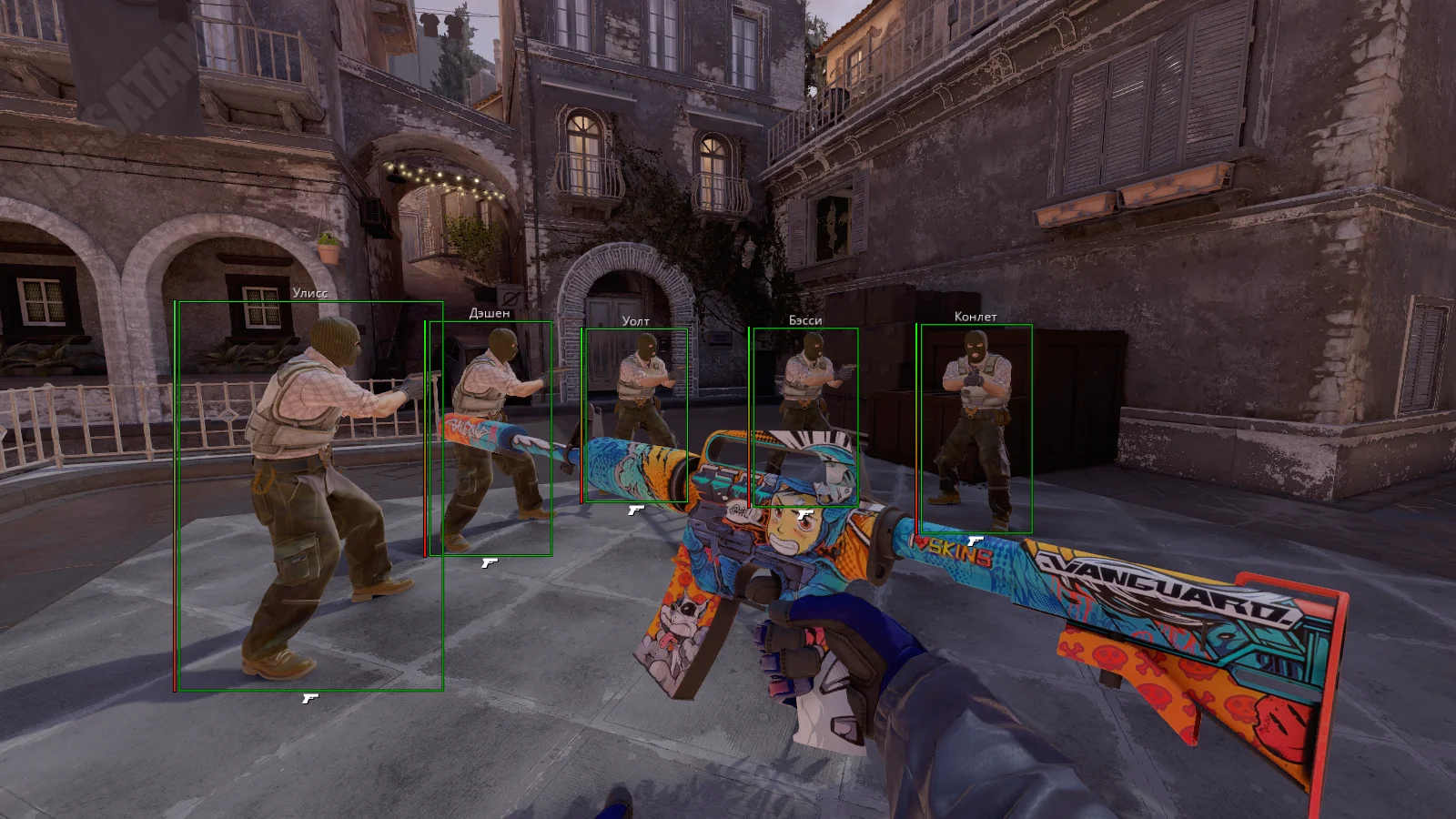
Advanced ESP featuring player visuals (boxes, skeletons, chams), loot tracking (weapons, grenades), and game objects (C4)
-
Visual customization including World Changer, Viewmodel adjustments, and effect modifications (smoke, flash)
-
Inventory Changer for adding any weapon, knife, and glove skins with custom parameters
-
Misc features like radar, auto-buy, damage indicators, and config system
Media
System Requirements
Operating System: Windows 10, Windows 11 (21H2, 22H2, 23H2, 24H2)
Processor: Intel & AMD
Graphics Card: Nvidia & AMD
Client: Steam

All current functionality is below, screenshots and product descriptions above may differ from this list of functions.
CHECKOUT
Select the desired subscription plan
Global Settings - this part of the aim tab contains settings common to all weapons
Enable - enable/disable the aimbot feature as a whole
Visible Check - check for visibility, fire only at targets in direct line of sight
Enemy Only - aim only against enemy characters, disable if you play in DM
Flash Check - checks for blindness, disables AIM when you are blinded
Switch Delay - the length of the delay between the aimbot changing its target
Aim Key - key binding which, when held down, will cause aiming to work
Draw FOV - show the size of the FOV area on the screen using a circle around the crosshair
FOV Color - the color of the circle line that shows the size of the FOV area of the aim
Separate settings for each weapon - separate settings for each weapon
Copy Settings for Weapon Group - copy the settings of this weapon to all weapons of its type
Copy Settings for all weapons - copy these settings for all weapons in the game
Enable - enable/disable aimbot operation specifically for this weapon
FOV - the size of the area within which the aimbot will select targets for aiming
Smooth - the strength of smoothing the aimbot's movements, the higher the value, the smoother and slower the AIMBOT
Bones - selection of body parts that the aimbot will target during its work
RCS - Recoil Control System, works during shooting using an aimbot
RCS Bullet - the bullet (shot) number after which RCS will start working
RCS FOV - the FOV radius within which RCS will work, may be larger than the aim radius as a whole
RCS Scale - the power of recoil reduction using RCS
TriggerBot - enable/disable triggerbot, auto-shoot when target enters your sight
Trigger Key - the key that, when held down, will cause the triggerbot to work
Trigger Shot Delay - duration of intervals between trigger shots (in ms)
Enable - enable/disable features for displaying players using WH
Visible Only - if you activate this parameter, then the WH will work only for those players who are not behind the walls
Visible Check - targets behind walls and in direct line of sight are painted in different colors
Boxes ESP - ESP in the form of boxes
Boxes Style - box style, corners only or whole boxes
Lines - lines to player models (Snaplines)
Head - outline the head hitbox separately
Skeleton - wh in the form of skeletons
Arrows - arrows showing players off-screen
Chams - full coloring of enemy models using color or texture (material)
Chams Material - choice of style (material) of chams
Glow - outline of character silhouettes and its style
Health Bar - an indicator showing the amount of HP players have
Weapon - a weapon in a person's hands, text or icon
Name - player's nickname
ESP Preview - preview of how ESP will look with your settings, on the right in the menu
Weapons - show weapons using ESP
Weapon Boxes - boxes for weapons
Weapon Boxes Style - style of boxes for weapons
Weapon Name - names of displayed guns
Weapon Chams - Chams for displaying weapons
Weapon Chams Material - texture / material of weapon chams
Grenades - Displaying grenades using Loot ESP
Grenades Boxes - Displaying grenades using ESP
Grenades Boxes Style - style of boxes of grenades
He / Fire / Smoke / Flash Colors - separate color settings for different types of grenades
Grenade Prediction - predicting the trajectory of a grenade throw
Grenades Chams - display grenades using chams
Grenades Chams Material - choice of texture/materials for chams garnets
Visible Check - different colors of loot behind walls and in direct line of sight
C4 ESP - display bomb using ESP
C4 Box - boxes for C4
C4 Box Style - style of boxes for bombs
Timer (Text / Bar) - timer before explosion, in the form of text or indicator (bar)
World Changer - change the colors of various elements of the game
Custom Props - changes the color of game objects (barrels, doors, windows, etc.)
World Color - select color for all objects in the game
Props Colors - select colors for props (barrels, doors, windows, etc.)
Sky Color - color for painting the sky
Light Color - selection of colors for lighting (sun, lamps, etc.)
Smoke Color - paint smoke from a smoke grenade with a custom color
Viewmodel Changer - here you can adjust the viewing angle and position of your hands on the screen
Use Camera - apply the changed viewing angle to your camera
Override Scope - apply a modified viewing angle in aiming mode
Viewmodel FOV - change the viewing angle
Offset X / Y / Z - the position of the hands on the screen, allows you to move them in different directions
Damage Indicator - visually show hits on enemies
Hit Sound - sound when hitting an enemy
Hit Sound Volume - volume of sound when hitting
Inventory Changer - the ability to add skins to your inventory and use them
Weapon Changer - Allows you to change add and change skins for firearms
Knife Changer - the ability to put any knife skins
Gloves Changer - you can also change the skin of gloves
All Weapons - all weapon slots in the game are available for customization
All Skins - all skins in the game are available
Skin Filters by Rarity - skins are filtered by rarity
Wear - level of wear of the skin
Pattern - pattern of drawing on the skin
StatTrak - the ability to install StatTrak skins and set the counter value for them
Name - allows you to set custom names for skins
Add Item - adds the selected skin to the inventory
Remove Item - removes the selected skin from the inventory
Radar - a radar window on top of the game, shows players and other information
Spectators List - a window showing the list of players watching you
Bomb Timer - display the time until the bomb explodes (countdown)
Buy Bot - auto-purchase of the weapon you need at the beginning of the round
Buy Bot Settings (Primary, Secondary, Equipment) - auto-purchase settings, primary weapon, pistol, equipment
Preserve Killfeed - records your frags in the killfeed
Unlock Inventory - allows you to change the inventory of skins/weapons right during the match, you can equip a revolver instead of a deagle, etc.
Auto Accept - automatically accept the found match
Sniper Crosshair - scope for sniper rifles
Force Radar - Always display players on the in-game radar, even if they don't make sound
Removals - this subsection allows you to disable some elements of the game
No Smoke - disable smoke
No Flash - disable the flashing effect
No Legs - disable legs in 1st person
No Grenade Cross - disable the crosshair when aiming for a long time with a grenade in your hands
No View Bob - disable hand shaking when walking
No Scope - removes the dark background when you open the scope with a sniper rifle in your hands
No Team Intro - removes team intros in MM
CFG System - config system, allows you to save and load settings
Mini-Games - mini-games inside the cheat menu, allows you to pass the time
Customer Reviews
Instructions
Phoenix
11.02.26